Credential isolation
No ~/.aws, ~/.ssh, ~/.kube, or Docker config inside the container. Credentials are injected per-command by the host-side auth backend.
Docker keeps an agent in — it doesn't stop it from running terraform destroy with your credentials. Agent Cerberus adds the missing half.
git clone https://github.com/shkrwnd/agent-cerberus && cd agent-cerberus && ./start.sh
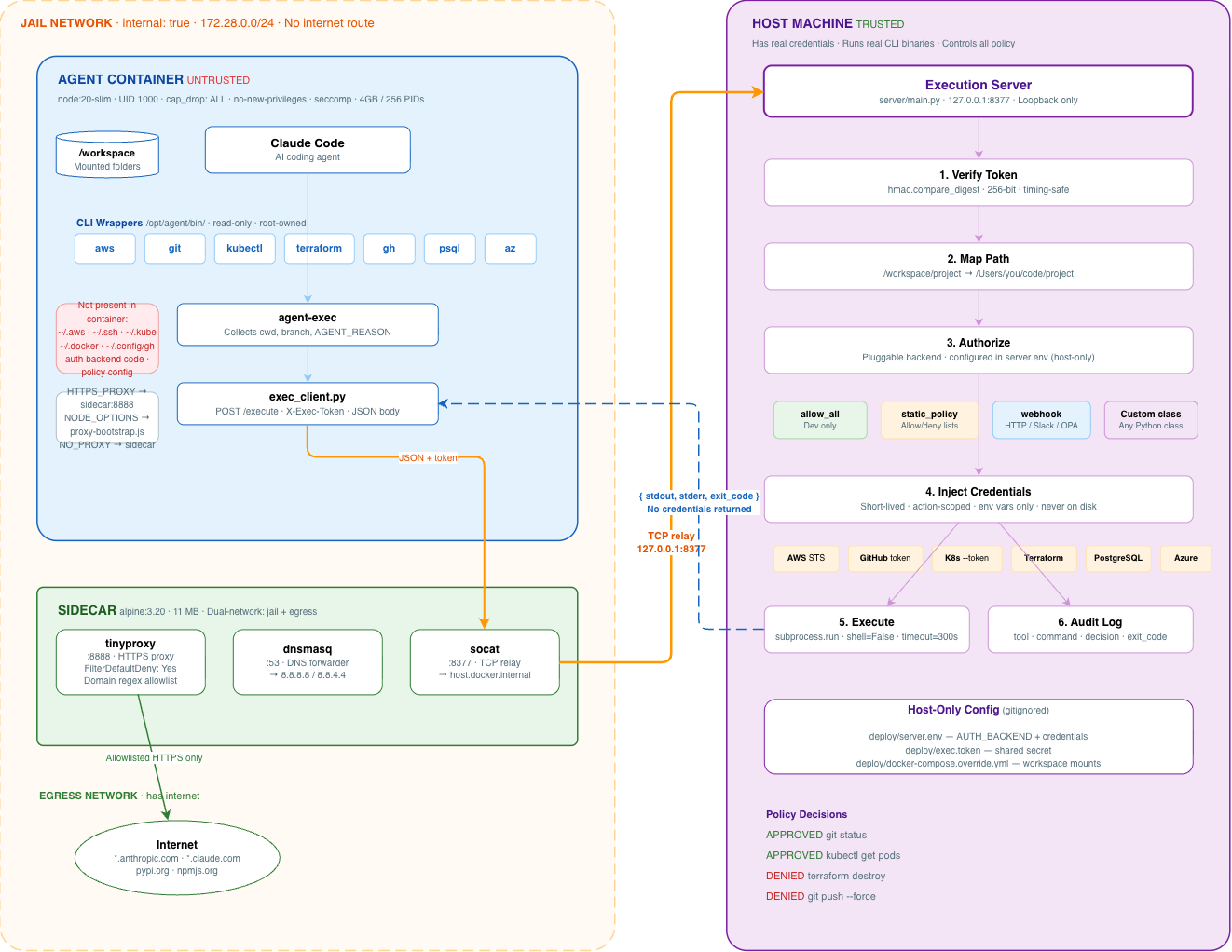
Shell wrappers replace aws, git, kubectl, terraform, and more inside the container. Claude Code sees real CLIs — they're shims that serialize every call as JSON and send it to the host.
The execution server runs on the host with real credentials. A pluggable auth backend decides approve/deny per command. The container never sees tokens, keys, or the policy itself.
The container sits on an internal: true Docker network with no internet. A tinyproxy sidecar allowlists domains. DNS goes through dnsmasq. Exfiltration is blocked at the network layer.
Every CLI call from the agent follows the same path: wrapper → agent-exec → sidecar relay → host execution server → auth backend → real binary (or denial).
aws s3 ls/opt/agent/bin/aws — a shell wrapper, not the real AWS CLIagent-exec, which POSTs {"tool":"aws","args":["s3","ls"]} to the sidecaraws with host credentials, returns stdout/stderrinternal: true network — no route to the internetHTTPS_PROXY — a bootstrap script patches the global HTTP agents at startupkubectl get pods -n prod
APPROVED static_policy · 12ms
→ broker terraform destroy -auto-approve
DENIED destructive operation blocked by policy
→ broker git push --force origin main
DENIED force push is on the deny list
Every layer is designed so that bypassing the sandbox gains nothing. The execution server authorizes on the host using policy the container cannot see or influence.
No ~/.aws, ~/.ssh, ~/.kube, or Docker config inside the container. Credentials are injected per-command by the host-side auth backend.
Static allow/deny lists, webhooks, OPA, or your own Python class. Switch backends in server.env without rebuilding.
Internal Docker network with a tinyproxy sidecar. Only allowlisted domains are reachable. Token exfiltration blocked at network layer.
Every command logged with tool, args, auth decision, exit code, and duration. Logged on the host, not inside the container.
cap_drop: ALL, no-new-privileges, seccomp profile, memory and pid limits, non-root user (UID 1000).
Execution server binds 127.0.0.1. Container reaches it via socat relay in the sidecar. Never exposed to the network.
| Control | Plain Docker | Other Solutions | Agent Cerberus |
|---|---|---|---|
| Process / filesystem isolation | Included | Included | Hardened |
| Credentials outside guest | Usually mounted | Env vars passed | Always isolated |
| Per-command authorization | None | Prompt only | Pluggable backends |
| Domain-filtered egress | Manual iptables | All-or-nothing | Allowlist proxy |
| Central audit trail | Container logs | None | Decision-level |
| Container hardening | User config | Minimal | seccomp + caps + non-root |
Docker and Git are the only requirements. Claude Code is installed inside the image.
git clone https://github.com/shkrwnd/agent-cerberus.git
cd agent-cerberus# deploy/docker-compose.override.yml
services:
claude:
volumes:
- /path/to/project:/workspace/project:rw# deploy/server.env
AUTH_BACKEND=server.auth_backends.static_policy.StaticPolicyBackend./start.sh